EasyClassify
深度学习分类库

© EURESYS S.A. - Subject to change without notice
8/13/2024 Datasheet 深度学习分类库 
Main benefitsOther benefits规格Software
Ordering Information
Offices
|
亮点
EasyClassify 说明
EasyClassify 是Deep Learning Bundle的分类工具。EasyClassify要求用户标记训练图像,也即告知哪些是优良图像,哪些是不良图像,或哪些图像属于哪个类别。在学习/训练过程之后,EasyClassify库将对图像进行分类。对于提供的任何图像,它将返回概率列表,显示图像属于所示教类别的可能性。例如,如果流程要求将不良部件与优良部件分开,EasyClassify将返回每个部件是优良还是不良,也会返回相应的概率。
Main benefits
Other benefits
Deep Learning Bundle功能比较
EasyClassify、EasySegment 和 EasyLocate 可作为 Deep Learning Bundle 的一部分购买,也可作为纯推理许可证单独购买。
下载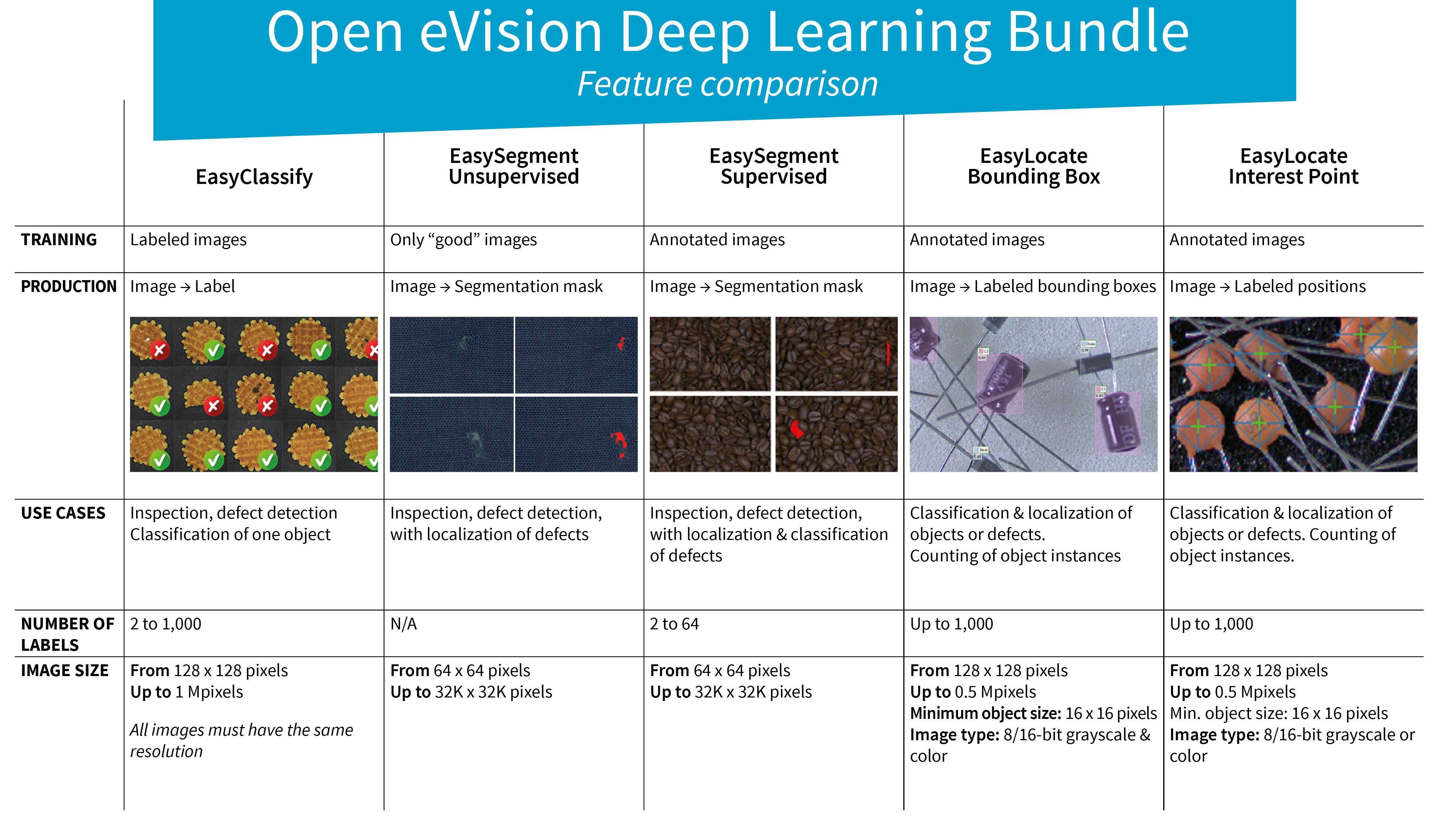
最新版驱动程序
eVision 26.10 新功能
- Open eVision 产品已更名为 eVision,并将纳入 Allied Vision 品牌。
- EasyBarCode 新增条码符号体系(symbologies),EasyQRCode 功能改进
- EasyImage 新增直线检测与孔洞填充功能
- 支持 NVIDIA Jetson DLA(深度学习加速器)
- eVision Studio 新增工具并改进易用性
- 全面修订的在线文档
驱动程序
eVision 包含免费的 Deep Learning Studio应用程序。在创建数据集以及深度学习工具的训练和测试过程中,该应用程序将为用户提供协助。对于 EasySegment,Deep Learning Studio 集成了注释工具,可以将预测转换为真实注释。它还支持根据性能要求以图形方式配置工具。例如训练过后,可以在更高的缺陷检测率或更高的良品检测率之间进行权衡。下载
EasyClassify、EasySegment 和 EasyLocate 可作为 Deep Learning Bundle 的一部分购买,也可作为纯推理许可证单独购买。
规格
Software
- Host PC Operating System
eVision is a set of 64-bit libraries that require an Intel compatible processor with the SSE4 instruction set or an ARMv8-A compatible processor.
eVision can be used on the following operating systems:
Microsoft Windows 11, 10 for x86-64 (64-bit) processor architecture
Microsoft Windows 11, 10 IoT Enterprise for x86-64 systems
Linux for x86-64 (64-bit) and ARMv8-A (64-bit) processor architectures with a glibc version greater or equal to 2.18
Remote connections
Remote connections are allowed using remote desktop, TeamViewer or any other similar software.
Virtual machines
Virtual machines are supported. Microsoft Hyper-V, Oracle VirtualBox and libvirt hypervisors have been successfully tested.
Only the Neo Licensing System is compatible with virtualization.
Minimum requirements:
2 GB RAM to run an eVision application
8 GB RAM to compile an eVision application
Between 100 MB and 2 GB free hard disk space for libraries, depending on selected options.
- APIs
Supported programming languages :
The eVision libraries and tools support C++, Python and the programming languages compatible with the .NET (C#, VB.NET)
C++ requirements: A compiler compatible with the C++ 11 standard is required to use Open eVision
Python requirements: Python 3.11 or later is required to use the Python bindings for Open eVision
.NET requirements: .NET framework 4.8 (or later) or the .NET platform 6.0 (or later) are supported
Supported Integrated Development Environments:
Microsoft Visual Studio 2017 (C++, C#, VB .NET, C++/CLI)
Microsoft Visual Studio 2019 (C++, C#, VB .NET, C++/CLI)
Microsoft Visual Studio 2022 (C++, C#, VB .NET, C++/CLI)
QtCreator 4.15 with Qt 5.12
Ordering Information
- Product status
Released
- Product code - Description
[PC4337] EasyClassify (Neo)
[PC4187] EasyClassify (Legacy USB Dongle)
[PC4237] EasyClassify (Legacy PAR Dongle)
- Included libraries
EasyClassify
- Related products
[PC6512] Legacy eVision/eVision USB Dongle (empty)
[PC6514] Neo USB Dongle (empty)
[PC6516] Neo USB Header (empty)
下载区域
Open eVision
- 32-bit applications were supported up to Open eVision 23.04
- Other End of Life Announcements are detailed in Open eVision release notes
eVision
Please use Open eVision instead for new developements.
测试我们的深度学习解决方案
如果您想要使用我们的深度学习库和应用程序对项目进行免费评估,请使用该提交表。我们会免费为您的项目测试我们的深度学习解决方案。