eVision 26.6の新機能
- ユーザーによるEasyDeepOCRの再トレーニング
- 複数のパターンを使ったEasyFindとEasyMatchの学習
- eVision Studioに追加された新しいツールとユーザビリティの改善
- EasySpotDetectorのサポート廃止
- eVision Studioの優先による旧Studio製品の除去
旧Studio製品のアプリケーションを含む最後のバージョンはOpen eVision 26.02.2であることにご注意ください。
Deep Leaningセグメンテーションライブラリ

© EURESYS S.A. - Subject to change without notice
8/14/2024 Datasheet Deep Leaningセグメンテーションライブラリ /--/uploads/2023/11/EasySegment.png)
Main benefitsOther benefits仕様Software
Ordering Information
Offices
|
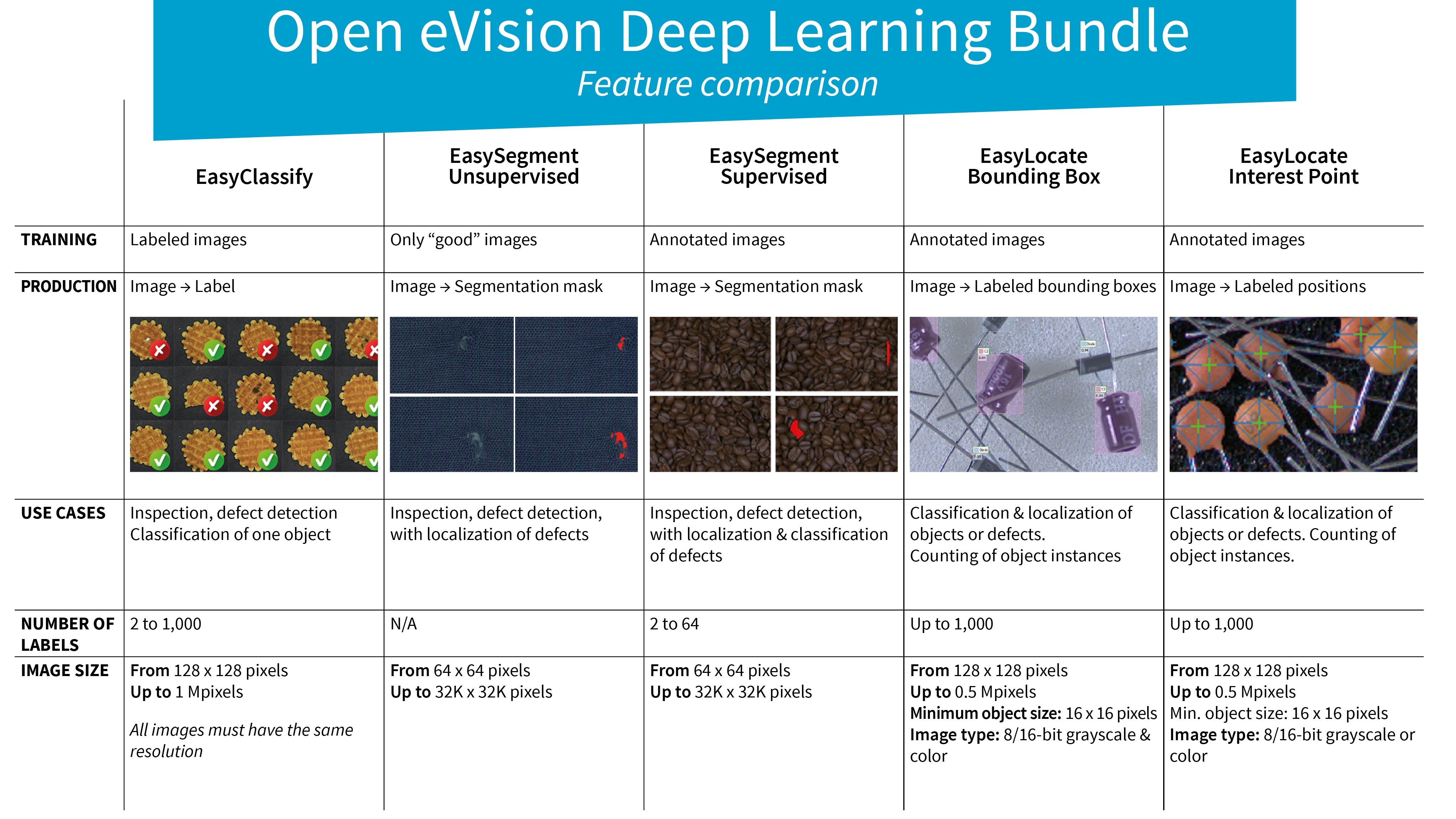
EasySegmentはDeep Learning Bundleのセグメンテーションツールです。EasySegmentは検出とセグメンテーションを実行します。欠陥のある部品を識別し、その欠陥の正確な位置を画像内でピンポイントに示します。
-EasySegmentの教師ありモードは画像内の欠陥と「合格」部分のモデルを学習することで機能します。これには、予測セグメンテーションとして注釈がつけられた画像を使ったトレーニングを通じて行われ、それが完了すると、新しい画像の欠陥を検出して分離するために使用できるようになります。
EasySegmentの教師ありモードは精度が高く、期待されるセグメンテーションに関する知識に基づくことで、教師なしモードに比べてより複雑な欠陥を分離することができます。
-EasySegmentの教師なしモードは、「合格」サンプル (欠陥のないサンプル) とされるモデルを学習して機能ます。これは、「合格」サンプルの画像のみを使ったトレーニングを通じて行われ、
それが完了すると、新しい画像を合格または欠陥に分類し、これらの画像から欠陥を分離するために使用できるようになります。あらかじめ欠陥の種類が不明な場合や欠陥サンプルが手元にない場合でも、合格のサンプル画像のみを使ってトレーニングすることで、EasySegmentの教師なしモードを使って検査を実施できます。
EasyClassify、EasySegment、およびEasyLocateは、Deep Learning Bundleの一部として、または推論限定ライセンスとして単体で購入可能です。
ダウンロード旧Studio製品のアプリケーションを含む最後のバージョンはOpen eVision 26.02.2であることにご注意ください。
Open eVisionには無償のDeep Learning Studioアプリケーションが含まれます。このアプリケーションは、データセットの作成やディープラーニングツールのトレーニングと検証においてユーザーを支援するためのツールです。Deep Learning StudioはEasySegmentにアノテーションツールを統合し、予測結果を正解アノテーションに変換することを可能にします。また、ツールを性能要件に合わせてグラフィカルに設定することも可能になります。たとえば、トレーニングの後で、より高い欠陥検出率とより高い合格検出率のどちらかを選択することができます。
Open eVision is a set of 64-bit libraries that require an Intel compatible processor with the SSE4 instruction set or an ARMv8-A compatible processor.
Open eVision can be used on the following operating systems:
Microsoft Windows 11, 10 for x86-64 (64-bit) processor architecture
Microsoft Windows 11, 10 IoT Enterprise for x86-64 systems
Linux for x86-64 (64-bit) and ARMv8-A (64-bit) processor architectures with a glibc version greater or equal to 2.18
Remote connections
Remote connections are allowed using remote desktop, TeamViewer or any other similar software.
Virtual machines
Virtual machines are supported. Microsoft Hyper-V, Oracle VirtualBox and libvirt hypervisors have been successfully tested.
Only the Neo Licensing System is compatible with virtualization.
Minimum requirements:
2 GB RAM to run an Open eVision application
8 GB RAM to compile an Open eVision application
Between 100 MB and 2 GB free hard disk space for libraries, depending on selected options.
Supported programming languages :
The Open eVision libraries and tools support C++, Python and the programming languages compatible with the .NET (C#, VB.NET)
C++ requirements: A compiler compatible with the C++ 11 standard is required to use Open eVision
Python requirements: Python 3.11 or later is required to use the Python bindings for Open eVision
.NET requirements: .NET framework 4.8 (or later) or the .NET platform 6.0 (or later) are supported
Supported Integrated Development Environments:
Microsoft Visual Studio 2017 (C++, C#, VB .NET, C++/CLI)
Microsoft Visual Studio 2019 (C++, C#, VB .NET, C++/CLI)
Microsoft Visual Studio 2022 (C++, C#, VB .NET, C++/CLI)
QtCreator 4.15 with Qt 5.12
Released
[PC4338] EasySegment (Neo)
[PC4188] EasySegment (Legacy USB Dongle)
[PC4238] EasySegment (Legacy PAR Dongle)
EasySegment
[PC6512] eVision/Open eVision USB Dongle (empty)
[PC6514] Neo USB Dongle (empty)
[PC6516] Neo USB Header (empty)
Please use Open eVision instead for new developements.
Deep Learningライブラリとアプリケーションを使ってプロジェクトを無償評価していただくための提出フォームです。お客様のプロジェクトを使って、無償で弊社のディープラーニングソリューションをお試しください。